



Version History
1.12 build 250 (July 3, 2023)
✓ Added two options in the Text Paster settings window "Remap programmatic mouse button presses" and "Remap programmatic keyboard key presses".
1.12 build 240 (August 4, 2022)
✓ Fixed localization issues.
✓ Added a Czech localization.
1.12 build 230 (February 18, 2022)
✓ Fixed a bug with tooltips.
1.12 build 220 (February 6, 2022)
✓ Fixed compatibility issues with Windows 11.
✓ Fixed incorrect display of controls on high DPI screens.
✓ Fixed localization issues.
1.11 build 216 (April 21, 2021)
✓ In multi-line input fields, automatic text wrapping has been implemented instead of horizontal scrolling.
✓ Exceptions have been improved: you can now specify application folders, apply window titles only for specific applications and application folders, and extract text from the window titles of running applications.
✓ Fixed a bug with Alt + Tab in Windows 10.
✓ Fixed localization issues.
✓ Added a Romanian localization.
1.10 build 208 (January 4, 2019)
✓ Fixed issues with "Mouse Hook Error" and "Keyboard Hook Error" messages.
✓ Fixed issues with Text Paster hanging.
✓ Fixed issues with full-screen view of the main window.
✓ Fixed localization issues.
1.10 build 200 (September 20, 2018)
✓ Added a Polish localization.
✓ Fixed localization issues.
1.10 build 190 (May 8, 2018)
✓ Fixed compatibility issues in Windows 10.
✓ Added an Italian localization.
1.10 build 180 (March 1, 2018)
✓ Fixed compatibility issues in Windows 10.
✓ Fixed the "Access Memory Violation" error and similar ones that led to Text Paster crashes on some systems.
✓ Fixed an issue whereby Text Paster sometimes wouldn't run at Windows startup on some systems.
✓ Fixed an issue whereby the state (expanded/collapsed) of folders/menu was not saved correctly.
✓ Now the app window can also be opened/closed by a single click on the icon in the system tray.
✓ Improved the interface. Now all of the fonts use the scaling defined by the system.
✓ Fixed localization issues.
✓ Added French, Japanese and Spanish localizations.
✓ All the application's executables are now also signed with Symantec SHA-256 digital certificate.
1.9 build 170 (September 18, 2015)
✓ Fixed compatibility issues in Windows 10.
✓ The keyboard and mouse engine has been optimized with a focus on performance.
1.9 build 167 (September 2, 2015)
* Fixed compatibility issues in Windows 10.
* The keyboard and mouse engine has been optimized.
* Fixed localization issues. The "Snapshot" key was also renamed into "Prt Sc".
1.8 build 160 (June 24, 2015)
✓ Added a Portuguese (Brazil) localization.
✓ Now exceptions are sorted alphabetically.
✓ Fixed compatibility issues in Windows 10 (Preview).
✓ Fixed a bug that caused modifiers to "stick" or be redefined incorrectly.
✓ Fixed a bug that prevented the system tray icon from hiding in Windows XP.
1.7 build 158 (February 3, 2014)
✓ Fixed a bug – the items on the pop-up menus were sometimes displayed in wrong order.
✓ Optimized the loading block of system libraries.
✓ Added intelligent storage of the previous text format in the action "Paste Text" – Plain text (default) / RTF text.
✓ Added storing of path in the export profiles window.
✓ Fixed localization issues.
1.6 build 150 (November 21, 2013)
✓ Added a possibility to copy, cut and paste actions and folders/menus from the clipboard (standard and familiar Ctrl+C, Ctrl+X and Ctrl+V combinations).
✓ Added a possibility to copy an entire profile to the clipboard as a folder. This comes in handy when you need to copy all the actions of one profile to another or need to reorganize the current one.
✓ Added an option - fill a newly-created profile with the actions of the current one.
✓ Fixed a memory leak that resulted in a moderate increase of the size of the profiles file after each program start.
✓ Fixed a bug with incorrect scaling and displaying of toolbar buttons and other controls.
✓ Fixed a bug with the system tray icon menu – when it was clicked, it occasionally brought up the system menu along with the Text Paster menu.
✓ Fixed a bug that caused the program icon to disappear from the notification area.
✓ Fixed a bug – template RTF text appeared in a wrong encoding when pasted as plain text.
✓ Fixed a bug – the reset button of the 9th user modifier didn’t work.
✓ Fixed a bug that reset exceptions when the “clear key” button was clicked.
✓ Fixed a bug – the names of some actions were not saved if the Enter key was pressed during their editing.
✓ Added a German localization.
✓ Added template dates in the Russian format to the Russian version of the program.
✓ Added a template for converting a selected text fragment or text in the clipboard from the Russian keyboard layout to the German one (and vice versa).
1.5 build 148 (January 10, 2013)
✓ Fixed the error with the emulation of X1 and X2 mouse button presses.
1.5 build 147 (January 5, 2013)
✓ Added a possibility to remap mouse wheel left and right rotation/tilting (only for Windows Vista and newer versions).
✓ Fixed the error in exceptions – programs could not be recognized by the window title if user-defined strings contained uppercase letters.
✓ Fixed the error with auto-naming of exceptions.
1.4 build 130 (November 19, 2012)
✓ All the application's executables are now signed with VeriSign's (Symantec) digital certificate.
✓ Fixed localization issue - failure to keep the language selected during the installation when the application runs for the first time.
✓ Fixed bug in templates %t_seltext_skl_enru and %t_cbtext_skl_enru.
1.4 build 129 (November 2, 2012)
✓ Fixed bugs in the "Paste Text" -> "Plain Text" action - it truncated large texts (approximately 2 KB and above) and sometimes pasted wrong characters.
✓ Fixed UNICODE support bug in the "Paste Text" action.
1.4 build 127 (October 29, 2012)
✓ Fixed a bug - template %t_seltext (currently selected text) sometimes returned empty value.
✓ Added new templates:
%t_seltext_uc/%t_cbtext_uc - returns selected text/clipboard content in UPPERCASE.
%t_seltext_lc/%t_cbtext_lc - returns selected text/clipboard content in lowercase.
%t_seltext_skl_enru/%t_cbtext_skl_enru - returns converted selected text/clipboard content from Cyrillic layout to Latin and vice versa (depending on the original text characters).
✓ Fixed a bug - "Exceptions" did not work with 64-bit applications (as well as with some 32-bit ones).
✓ Fixed a bug - "Exceptions" did not work on the second press.
✓ Added waiting cancellation on the second press of a wrong (not predefined) key/mouse button.
✓ Added internal labels to interface elements to help users with disabilities navigate the application.
1.3 build 114 (October 12, 2012)
✓ Fixed compatibility issues in Windows 8.
✓ Fixed the bug that prevented Text Paster from running on certain systems.
1.3 build 108 (January 2, 2012)
✓ Added a possibility to select items from the actions popup menu using the keyboard cursor and a hotkey combination matching the initial letters of corresponding menu items.
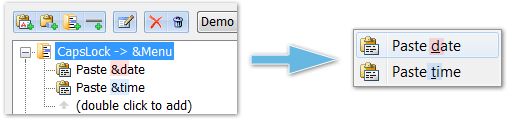
✓ Added a possibility to instantly launch menu items using a hotkey that can be defined right in the names of nested menu actions by inserting the "&" character before the necessary character/key. Example: Paste &date - "d" will be the hotkey for this menu item:
✓ Fixed the incorrect display of program icons in the notifications area of the taskbar when enlarged Windows screen fonts were used.
1.2 build 92 (December 6, 2011)
✓ Fixed the bug that generated a message like "The instruction at... The memory could not be written." and that occurred on some systems.
1.2 build 89 (November 25, 2011)
✓ Fixed an issue that caused damage to program profiles.
✓ Fixed issues with memory leaks and termination of "Type in text" and "Paste text" actions after they were called too many times or for a very long time.
✓ Added a possibility to export and import (back up) profile data and program settings. Added "Import..." and "Export..." commands to the "File" menu.
✓ Added a possibility to choose the interface language right from the main program menu: Tools -> Language.
1.1 build 72 (September 2, 2010)
✓ Fixed an issue that caused the program to consistently shut down if Kaspersky Internet Security 2011 was installed on the system.
✓ Changed the location of buttons on the toolbar. Button icons are now more intuitive and self-explanatory.
✓ Added a possibility to launch Text Paster in a hidden mode using the /hidden parameter (key)
✓ Fixed an issue with no focus in the list of actions.
✓ In exceptions, in the executable file selection popup menu: added program icons that help find associated programs visually.
1.0 build 64 (November 19, 2009)
✓ The first release of Text Paster (version 1.0) is out.