



Version History
1.15 build 460 (August 4, 2022)
✓ Fixed localization issues.
✓ Added a Czech localization.
1.15 build 450 (March 7, 2022)
✓ Fixed a bug in the "Key sequence" action.
1.15 build 440 (February 18, 2022)
✓ Fixed a bug in the "Key sequence" action: the click on the "Stop recording" button was added to the list.
✓ Fixed a bug with tooltips.
1.15 build 430 (February 6, 2022)
✓ Fixed compatibility issues with Windows 11.
✓ Fixed incorrect display of controls on high DPI screens.
✓ Fixed localization issues.
1.14 build 420 (April 21, 2021)
✓ Optimized code and minimized delays.
✓ You can now configure actions to work only for a specific keyboard layout, depending on whether Caps Lock, Num Lock, and Scroll Lock are toggled on or off, and for fullscreen/windowed mode.
✓ Exceptions have been improved: you can now specify application folders, apply window titles only for specific applications and application folders, and extract text from the window titles of running applications.
✓ In multi-line input fields, automatic text wrapping has been implemented instead of horizontal scrolling.
✓ The ability to interrupt an action using a hotkey has been added ("Key Manager control" action).
✓ Fixed a bug with Alt + Tab in Windows 10.
✓ Fixed a bug that caused keys to "stick" or be remapped incorrectly.
✓ Fixed bugs with Numpad keys.
✓ Fixed localization issues.
✓ Added a Romanian localization.
1.13 build 416 (January 4, 2019)
✓ Fixed issues with "Mouse Hook Error" and "Keyboard Hook Error" messages.
✓ Fixed issues with Key Manager hanging.
✓ Fixed issues with full-screen view of the main window.
✓ Fixed issues with left-clicking on the system tray icon for interrupting an action.
✓ Fixed issues with no other actions working when the pop-up menu is displayed.
✓ Fixed localization issues.
1.13 build 400 (September 20, 2018)
✓ Added a Polish localization.
✓ Fixed localization issues.
1.13 build 380 (May 8, 2018)
✓ Fixed compatibility issues with Windows 10.
✓ Added an Italian localization.
1.13 build 370 (March 1, 2018)
✓ Fixed compatibility issues with Windows 10.
✓ Fixed the "Access Memory Violation" error and similar ones that led to Key Manager crashes on some systems.
✓ Fixed an issue whereby Key Manager sometimes wouldn't run at Windows startup on some systems.
✓ Fixed an issue with the double click on the system tray icon.
✓ Fixed an issue whereby the state (expanded/collapsed) of folders/menu was not saved correctly.
✓ Improved the interface. Now all of the fonts use the scaling defined by the system.
✓ Fixed localization issues.
✓ Added a Japanese localization.
1.12 build 360 (January 15, 2017)
✓ Now the app window can also be opened/closed by a single click on the icon in the system tray.
✓ Added French and Spanish localizations.
✓ Fixed localization issues. The "Cancel" key was also renamed into "Break", and "Apps" into "Context Menu".
✓ All the application's executables are now also signed with Symantec SHA-256 digital certificate.
1.11 build 350 (September 18, 2015)
✓ Fixed compatibility issues with Windows 10.
✓ The keyboard and mouse engine has been optimized with a focus on performance.
1.11 build 342 (September 2, 2015)
✓ Fixed compatibility issues with Windows 10.
✓ The keyboard and mouse engine has been optimized.
✓ Fixed bugs in the "Open a web page" action.
✓ Fixed bugs in the "Launch a program or file" action.
✓ Fixed localization issues. The "Snapshot" key was also renamed into "Prt Sc".
1.10 build 330 (May 17, 2015)
✓ Added a Portuguese (Brazil) localization.
1.10 build 328 (May 5, 2015)
✓ Fixed a bug that prevented the system tray icon from hiding in Windows XP.
1.10 build 327 (April 24, 2015)
✓ Fixed compatibility issues with Windows 10 (Preview).
1.10 build 324 (April 19, 2015)
✓ Fixed a bug in the mouse cursor positioning block.
1.10 build 322 (April 18, 2015)
✓ Added the possibility to position and shift the mouse cursor relative to the entire screen, active window, and previous position (in the "Key sequence" action) with the option of returning the cursor to the initial position once the action is performed. Please see the accompanying video below.
✓ Added the possibility to start and stop recording using hot keys (F12 is the default hot key, but it can be customized in the program settings) in the "Key sequence" action. This is especially useful when recording mouse clicks.
✓ Fixed a bug that caused modifiers to "stick" or be redefined incorrectly.
✓ New more intuitive system tray icons for Pause and Record.
✓ Now exceptions are sorted alphabetically.
✓ Fixed localization issues.
1.9 build 312 (February 3, 2014)
✓ Fixed a bug with the constant setting of the left mouse button in the fields of definition, which also made it impossible to read the keys from the on-screen keyboards and tablets.
✓ Fixed a bug – it was difficult to define key combinations with mouse buttons. For example, Ctrl + Right mouse button.
✓ Fixed a bug – the items on the pop-up menus were sometimes displayed in wrong order.
✓ Optimized the loading block of system libraries.
✓ Added intelligent storage of the previous text format in the action "Paste Text" – Plain text (default) / RTF text.
✓ Added storing of path in the export profiles window.
✓ Fixed localization issues.
1.8 build 304 (November 21, 2013)
✓ Added a possibility to remap Alt, Ctrl, Shift and Win modifier keys as standalone keys.
✓ Added a possibility to copy, cut and paste actions and folders/menus from the clipboard (standard and familiar Ctrl+C, Ctrl+X and Ctrl+V combinations).
✓ Added a possibility to copy an entire profile to the clipboard as a folder. This comes in handy when you need to copy all the actions of one profile to another or need to reorganize the current one.
✓ Added an option - fill a newly-created profile with the actions of the current one.
✓ Fixed a memory leak that resulted in a moderate increase of the size of the profiles file after each program start.
✓ Fixed a bug with incorrect scaling and displaying of toolbar buttons and other controls.
✓ Fixed a bug with the system tray icon menu – when it was clicked, it occasionally brought up the system menu along with the Key Manager menu.
✓ Fixed a bug that caused the program icon to disappear from the notification area.
✓ Fixed a bug – template RTF text appeared in a wrong encoding when pasted as plain text.
✓ Fixed a bug – the reset button of the 9th user modifier didn’t work.
✓ Fixed a bug that reset exceptions when the “clear key” button was clicked.
✓ Fixed a bug – the names of some actions were not saved if the Enter key was pressed during their editing.
✓ Added a German localization.
✓ Added template dates in the Russian format to the Russian version of the program.
✓ Added a template for converting a selected text fragment or text in the clipboard from the Russian keyboard layout to the German one (and vice versa).
1.7 build 287 (January 10, 2013)
✓ Fixed the error with the emulation of X1 and X2 mouse button presses.
1.7 build 284 (January 5, 2013)
✓ Added a possibility to remap mouse wheel left and right rotation/tilting (only for Windows Vista and newer versions).
✓ Fixed the error with the emulation of X1 and X2 mouse button presses.
✓ Fixed the error in exceptions – programs could not be recognized by the window title if user-defined strings contained uppercase letters.
✓ Fixed the error with auto-naming of exceptions.
1.6 build 279 (November 19, 2012)
✓ All the application's executables are now signed with VeriSign's (Symantec) digital certificate.
✓ Fixed localization issue – failure to keep the language selected during the installation when the application runs for the first time.
✓ Fixed bug in templates %km_seltext_skl_enru and %km_cbtext_skl_enru.
1.6 build 277 (November 2, 2012)
✓ Fixed bugs in the "Paste Text" -> "Plain Text" action - it truncated large texts (approximately 2 KB and above) and sometimes pasted wrong characters.
✓ Fixed UNICODE support bug in the "Paste Text" action.
1.6 build 274 (October 29, 2012)
✓ Added remapping the left mouse button.
✓ Simplified setting the left mouse button.
✓ Fixed a bug - "Exceptions" did not work with 64-bit applications (as well as with some 32-bit ones).
✓ Fixed a bug - "Exceptions" did not work on the second press.
✓ Added waiting cancellation on the second press of a wrong (not predefined) key/mouse button.
✓ Fixed a bug - template %km_seltext (currently selected text) sometimes returned empty value.
✓ Added new templates:
%km_seltext_uc/%km_cbtext_uc - returns selected text/clipboard content in UPPERCASE.
%km_seltext_lc/%km_cbtext_lc - returns selected text/clipboard content in lowercase.
%km_seltext_skl_enru/%km_cbtext_skl_enru - returns converted selected text/clipboard content from Cyrillic layout to Latin and vice versa (depending on the original text characters).
✓ Added setting specific volume level (action "System command"->"Sound"->"Set volume").
✓ Added internal labels to interface elements to help users with disabilities navigate the application.
1.5 build 267 (October 12, 2012)
✓ Fixed compatibility issues with Windows 8.
✓ Fixed the bug that prevented Key Manager from running on certain systems.
1.5 build 262 (January 2, 2012)
✓ Fixed issues with memory leaks and termination of "Type text" and "Paste text" actions.
1.5 build 250 (December 29, 2011)
✓ Added a possibility to select items from the actions popup menu using the keyboard cursor and a hotkey combination matching the initial letters of corresponding menu items.
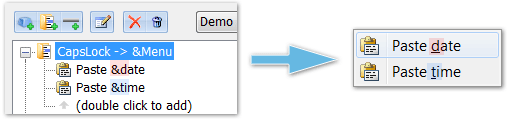
✓ Added a possibility to instantly launch menu items using a hotkey that can be defined right in the names of nested menu actions by inserting the "&" character before the necessary character/key. Example: Paste &date - "d" will be the hotkey for this menu item:
✓ Fixed the incorrect display of program icons in the notifications area of the taskbar when enlarged Windows screen fonts were used.
1.4 build 228 (September 2, 2010)
✓ Added a possibility to launch Key Manager in a hidden mode using the /hidden parameter (key)
✓ Fixed an issue with no focus in the list of actions.
✓ In exceptions, in the executable file selection popup menu: added program icons that help find associated programs visually.
1.4 build 216 August 27, 2010
✓ Fixed an issue that caused the program to consistently shut down if Kaspersky Internet Security 2011 was installed on the system.
✓ The names of "Paste text" and "Type text" actions are now longer in the list of actions and popup menu.
1.4 build 192 (August 9, 2010)
✓ Fixed an issue that caused damage to program profiles.
✓ Fixed a bug - the system volume action did not work in Windows 7. You can also set the per-cent value of volume adjustment.
✓ Added a new action - "Control Key Manager" - that allows you to create actions that switch profiles, pause and unpause Key Manager.
✓ Added new buttons to the toolbar for quick pasting, editing and deletion of actions, menus (folders) and menu delimiters. Button icons are now more intuitive.
✓ Added a possibility to export and import (back up) profile data and program settings. Added "Import..." and "Export..." commands to the "File" menu.
✓ Fixed issues with memory leaks and termination of "Type text" and "Paste text" actions after they were called too many times or for a very long time.
✓ Added a possibility to choose the interface language right from the main program menu: Tools -> Language.
1.3 build 184 (May 15, 2009)
✓ Added a possibility to set exact coordinates and size of active Windows windows in the "System command" action.
1.3 build 180 (April 11, 2009)
✓ Fixed an issue with modifiers freezing when the system returned from the blocked state.
1.3 build 179 (March 24, 2009)
✓ Added full UNICODE support in the "Paste text" action.
✓ Fixed an issue with pasting RTF text into text input fields when a short text with RTF formatting tags was pasted.
✓ Fixed a bug in the "Create an email" action.
1.3 build 171 (March 22, 2009)
✓ Fixed an issue with the start of "Open a web page" actions under Windows Vista - two pages opened instead of just one.
1.3 build 170 (March 21, 2009)
✓ Fixed a serious bug that caused the program to randomly shut down, which often occurred in Windows Vista.
✓ Fixed minor issues with displaying control elements when non-standard sizes of screen fonts were used.
1.3 build 158 (February 16, 2009)
✓ Added a new action - "Insert text" - that allow you to paste regular or formatted (RTF) text into input fields in various programs.
✓ Added new templates: %km_seltext - allows you to get the currently selected text and %km_cbtext - allows you to get the text content of the system clipboard. This text can be used for the following actions: "Paste text", "Type text", "Open a web page", "Start a program" and "Create an email ".
✓ Changed the template naming pattern and removed the validity area markers: {] and [}. From now on, all templates start with the %km_ prefix. For instance, to get the current time, you simply need to use the following command: %km_h:%km_m (for the 12-hour format) or %km_H:%km_m (for the 24-hour format).
✓ The settings of the "Key sequence" action became more functional. You can now record and set delays. We have also added a key press sequence editor to the program.
✓ Added a possibility to set delays between presses ("Options..." window) for the following actions: "Key sequence" and "Type text" .
✓ From now on, if a long action is executed, the program shows a special icon on the taskbar. You can click this icon (or use a popup menu) and cancel the action being performed.
✓ Fixed an issue that occurred when users tried to copy actions holding down the Ctrl key.
1.2 build 108 (December 6, 2008)
✓ Fixed bugs in users' modifiers.
✓ Fixed an issue that caused the mouse pointer to slow down when a resource-intensive task was executed.
✓ Added a possibility to emulate the presses of extended keys.
1.1 build 78 (November 25, 2008)
✓ Added an ability to redefine or assign actions to presses of mouse buttons or the mouse wheel rotation. For security reasons, the ability to use the left mouse button has been disabled (although the button can be used along with modifiers), as users may lose control over their systems.
✓ Added an ability to assign actions to a sequence of two keys (mouse buttons) or a key combination. For instance: "F, R" or "Ctrl + F, T" or "Alt + Ctrl + Left mouse button, Z". Such key sequences are often used in modern word processors and IDE's.
✓ Added an ability to allow or prohibit the use of certain keys in specific applications/windows.
✓ Added an ability to create custom modifiers (up to 16) and assign actions to key combinations containing them. For instance, you can define CapsLock or the X1 mouse button as a modifier named UM1. After that, you can assign actions to such combinations as: "UM1 + S", "Ctrl + UM1 + Q" and others.
✓ Added an ability to assign actions to dead keys. It was impossible in earlier versions, or the success of this task depended on the keyboard layout used; users could not accomplish this when using German, French or similar layouts with diacritic signs and/or special symbols.
✓ Added a field for specifying command line parameters in the "Launch a program" action.
✓ Added an ability to use separators in popup action menus.
✓ The keys engine has been completely rewritten and optimized with a focus on stability and performance.
✓ Fixed a bug that resulted in misoperation of actions if modifiers were released too early.
✓ Fixed a bug that caused modifiers to "stick" or be redefined incorrectly, which resulted in the loss or generation of redundant key codes.
✓ Fixed a bug that prevented actions from working in combination with the Alt modifier.
✓ Fixed the problem with incorrect operation of the LWin and RWin modifiers. In earlier versions, their release caused the "Start" menu to open.
1.0 build 52 (October 23, 2008)
✓ Fixed a bug that caused the program to lock when Alt was pressed (for accessing the main menu) in some operating systems.
✓ Fixed a bug with the positioning of controls after the first start of the program.
✓ The main menu has been redesigned in the Vista style.
1.0 build 45 (July 31, 2008)
* Fixed a serious bug that caused temporary system lockups.
✓ Modified two time insertion templates to work with the 24-hour time format.
1.0 build 32 (June 29, 2008)
✓ The icon refresh issue has been resolved. Previously, window and menu elements were rendered incorrectly.
✓ No sound is played when a text containing template keys is inserted.
1.0 build 16 (June 3, 2008)
✓ The first release of Key Manager (version 1.0) is out.